Create Tebex package
Sell coin packages on Tebex and deliver the coins to players automatically.
Each coin package is a Tebex package that runs one command on your server when someone buys it.
1. Link your server to Tebex
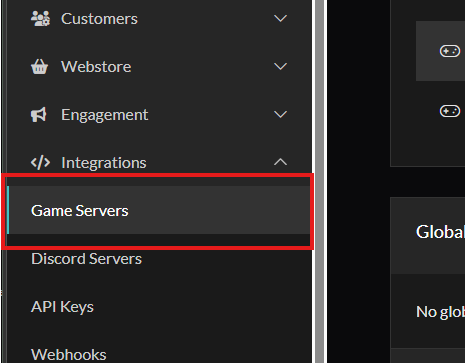
In your Tebex panel, open Integrations > Game Servers and follow Tebex's steps to link your FiveM server.
2. Create the package
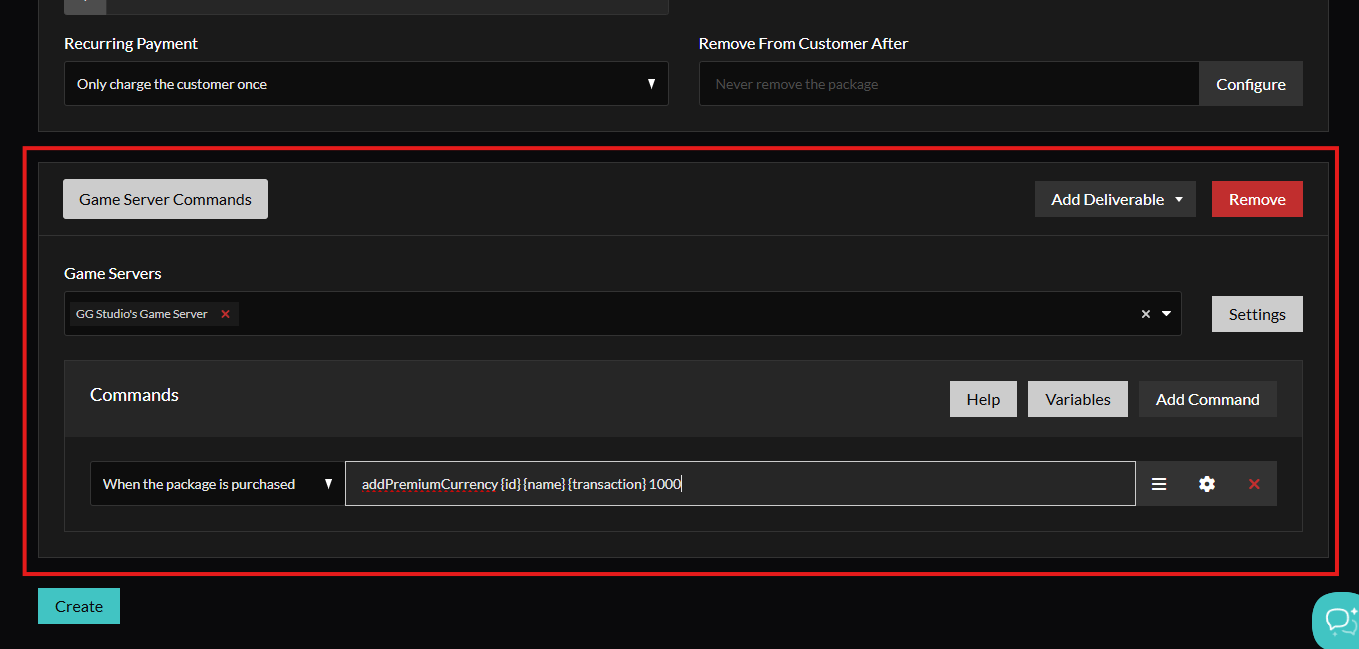
Create one package for each coin amount you sell. Under Game Server Commands, select your server, choose When the package is purchased and add this command:
addPremiumCurrency {id} {name} {transaction} 1000
Change 1000 to the number of coins in the package. Keep {id} {name} {transaction} as written: Tebex fills in the buyer's Cfx.re ID, username and transaction ID.
3. Add the package in game
Open Admin Panel > Settings > Currency and add a coin package with the same details:
| Field | What to enter |
|---|---|
| Coins Amount | The coins in the package, the same number as in the command |
| Price | The price on Tebex |
| Tebex URL | The link to the package on your Tebex store |
| Image URL | The image shown on the package card |
The copy button on each package copies its addPremiumCurrency command with the right coin amount, ready to paste into Tebex.
The store ships with four example packages that link to the GG Studio store. Replace or delete them.
How the coins arrive
When the payment completes, Tebex runs the command on your server.
- If the buyer has joined your server with the same Cfx.re account, the coins go to their balance straight away, online or offline. Online players get a notification.
- If the server does not know the buyer yet, the purchase is saved as a code. The player opens the store, clicks Redeem Code in the header and enters their Tebex transaction ID, which starts with
tbx-.
Every purchase is listed under Admin Panel > Transactions as Redeemed or Unredeemed.
Test it
You can test the command without a real purchase. In txAdmin, find your fivem: identifier under Players and use its number. Run this in the live console:
addPremiumCurrency 1234567 YourName tbx-test-1 100
You receive 100 coins and the transaction shows as Redeemed. Use a new transaction ID for every test.
Note
addPremiumCurrencyis a restricted command. It runs from the server console, which is where Tebex sends it. Players cannot run it from chat.